
A lot landed this week. The theme? Knowing who’s on the other end of the conversation, and making it count.
Chat Widget Feedback
Widget visitors can now rate conversations with a simple thumbs up or thumbs down. It’s a small thing that tells a lot. Which agents are nailing it? Which need tuning? Ratings flow straight into the activity dashboard so it’s easy to spot trends without digging through transcripts.
User Identity
This is the one I’m most excited about. It’s now possible to identify who’s chatting with an agent.
The way it works: the host app generates a signed JWT (JSON Web Token) containing the user’s details (name, email, phone, whatever’s available) and passes it to the widget before it loads. When the conversation starts, 88Agents verifies the signature and links the session to a known contact.
This also opens up future features like securely passing third-party system IDs (think stripe_customer_id, shopify_customer_id) into agents that can then troublesolve (that’s troubleshoot’s less violent cousin) directly into those systems on behalf of customers. “Has my order shipped yet?” “Please update my billing address in Stripe.” That kind of thing.
window.EightyEightAgents('identify', {
  token: 'eyJhbGciOiJIUzI1NiIs...'  // Server-generated JWT
});
The JWT is signed with a secret unique to the workspace, so it can’t be spoofed from the browser. The identity secret is stored encrypted alongside other credentials.
Why does this matter? Because once the agent knows who someone is, conversations have context. It’s talking to Sarah from Acme Corp on the Pro plan, not visitor #4,827. That opens the door to personalised responses, priority routing, and eventually tailoring behaviour based on who’s asking.
I think this is a building block for a lot of what comes next.
Revamped Contact Page
With identity flowing in, the contact page needed an upgrade. It’s now a proper customer profile with a timeline of every interaction.
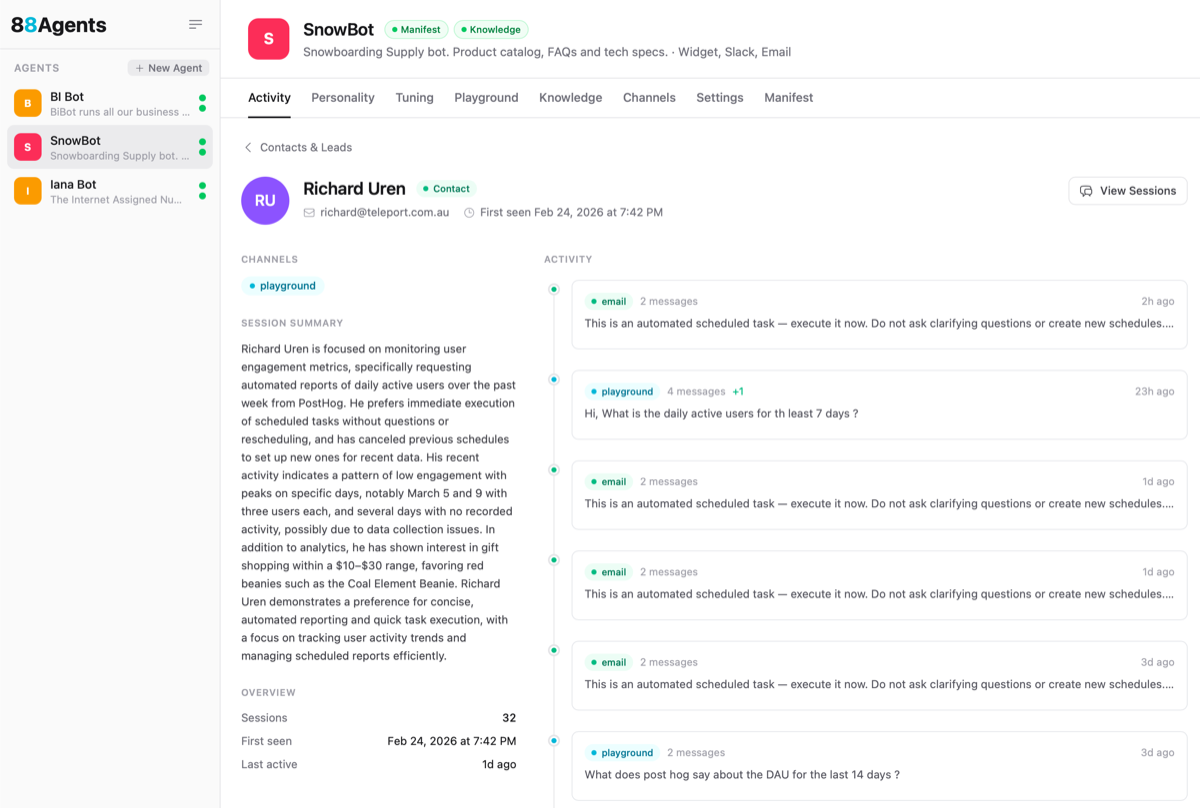
The full picture at a glance: name, email, phone, which channels they’ve used, any custom properties passed in via the widget (like plan or account type), and a chronological timeline of every conversation with message previews and metadata. It’s the kind of view a support team will live in.
There’s also an auto-generated Session Summary that distills all of a customer’s interactions with the agent into a quick read. In the screenshot above you can see that I was clearly in full-on beanie query mode for the past week. 😂 You can also spot the scheduled daily activity reports landing via email, which is a nice reminder that the agent is working even when I’m not watching.
DuckDB Query Engine
This one I’m pretty pumped about. 🚀 Agents calling MCP tools can now stash their results into temporary SQL tables (under the hood). That unlocks the full power of SQL for agent analysis. And while MCP is great for connecting to individual services, the real leverage comes from querying across silos. Agents can now join, summarise, and analyse data from completely different systems in a single query. Stripe revenue alongside Shopify orders alongside PostHog analytics. That’s the kind of thing that used to require a data warehouse.
Smarter Token Management
I’ve added a token budget guardrail to the tool loop so agents don’t burn through credits on a runaway conversation. Token usage estimates are now visible in the MCP settings tab, and the system distinguishes between token rate limits and frequency rate limits, retrying intelligently instead of giving up or looping forever. Tool loop progress is checkpointed so if a retry kicks in, the agent picks up where it left off.
Credential Health
Credentials now have health tracking built in. If an API key expires, an OAuth token is revoked, or a connection goes bad, it shows up immediately in the workspace settings. MCP OAuth re-authorization is smoother too, with the dialog auto-refreshing once the flow is complete.
S3 & HTTP Sources: Now Live
Following on from last week’s preview, S3 and HTTP credential providers are now fully available in the UI. Connect a bucket, point at an endpoint, and the agent starts indexing.
More coming soon. If identity or feedback is useful and there are thoughts, I’d love to hear from you.