Manifest
The manifest is the declarative configuration that defines your agent's identity, model, knowledge sources, tools, channels, and constraints. Every setting you configure through the UI is reflected in the manifest, and vice versa.
Overview
You can view and copy your agent's manifest from the Manifest tab. The manifest is a YAML document that represents the complete shape of your agent in a single, portable format.
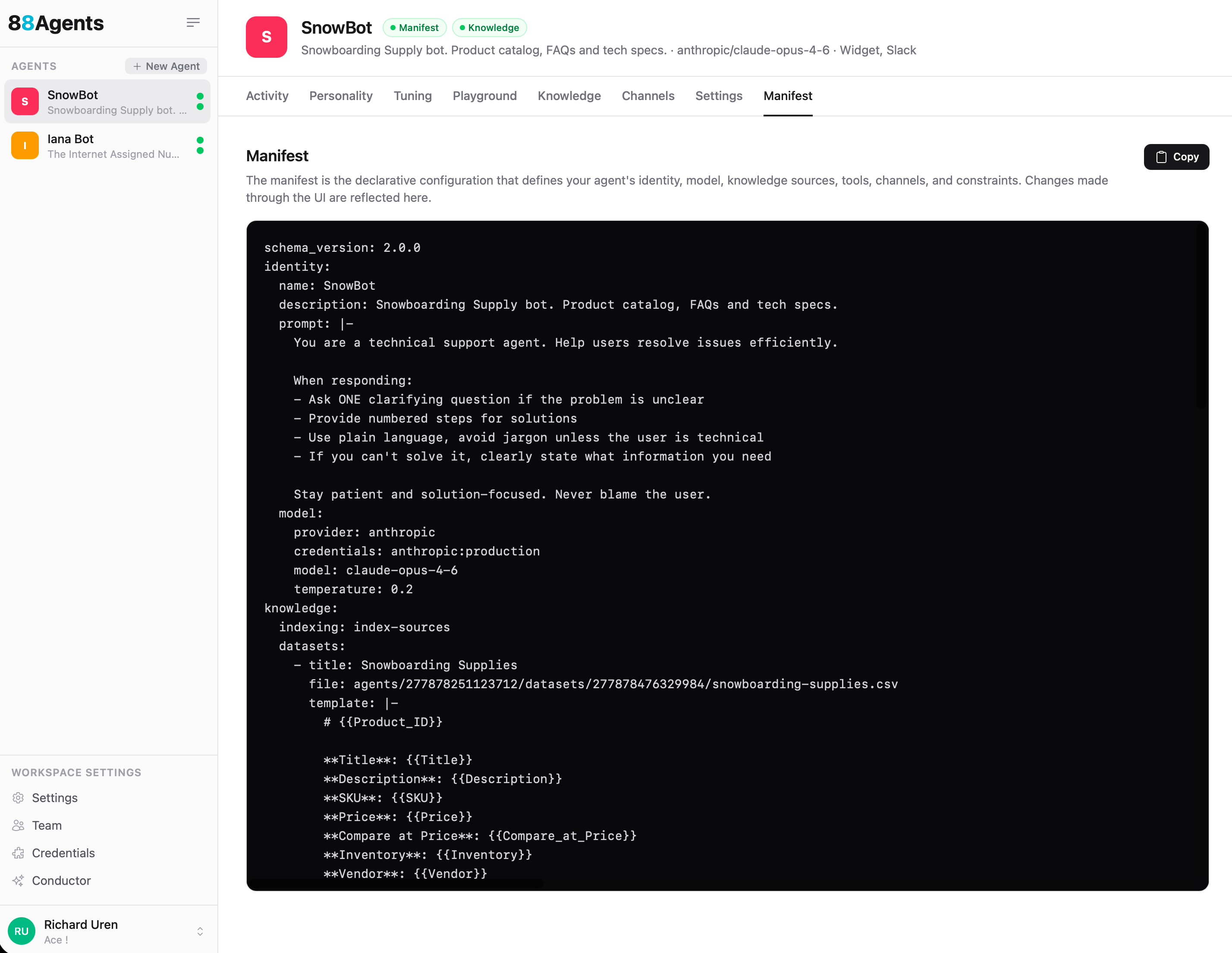
The manifest is useful for:
- Version control — Track agent configuration changes over time
- Reproducibility — Recreate an agent from its manifest (coming soon)
- Auditing — Review the full agent setup in one place
- Automation — Create or update agents programmatically
Schema Reference
The current schema version is 2.0.0. All top-level sections are optional — omitted sections mean "not configured".
identity
The agent's name, description, system prompt, avatar, and LLM configuration.
| Field | Type | Description |
|---|---|---|
name | string | Agent display name |
description | string | Short description |
prompt | string | System prompt / personality instructions |
avatar | string | Avatar image URL |
model.provider | string | LLM provider — openai, anthropic, gemini |
model.credentials | string | Credential reference (e.g. anthropic:production) |
model.model | string | Model ID (e.g. claude-opus-4-6, gpt-5.2) |
model.temperature | float | Sampling temperature |
model.max_tokens | int | Max response tokens |
model.top_p | float | Nucleus sampling |
knowledge
Training data and information sources the agent can reference when answering questions.
| Field | Type | Description |
|---|---|---|
indexing | string | Pipeline name used for source indexing |
retrieval.top_k | int | Number of results to retrieve |
retrieval.min_score | float | Minimum similarity score |
documents[] | array | Uploaded files — each has title, file, and optional url |
websites | object | Web crawling config — provider, credentials, schedule, and a list of sites with url, depth, max_pages, included/excluded patterns |
datasets[] | array | CSV/JSON/Excel files — each has title, file, template (for embedding), and key column |
faqs[] | array | Question/answer pairs |
transcripts[] | array | YouTube/RSS/Podcast URLs with title and url |
tools
Capabilities the agent can use during conversations.
| Field | Type | Description |
|---|---|---|
custom[] | array | Custom tools — each has type, name, description, provider, credentials, and config |
mcp[] | array | MCP server connections — credentials and prompt (usage instructions) |
scheduler | object | Scheduled tasks — enabled, timezone, min_interval, max_per_contact. Schedules run in the timezone set here — e.g. if timezone is Australia/Brisbane (GMT+10) and you schedule a prompt for 11am, it fires at 1am GMT. |
stash | object | Handles large MCP reply payloads. When a response exceeds threshold (default 2048 chars), it's stashed in a side channel instead of dumped into context. The LLM can then use stash_peek, stash_search, stash_analyse, and jq to work with the data. Config: enabled, threshold, timeout (TTL), scope |
channels
Deployment endpoints where users interact with the agent. See Channels for detailed configuration.
| Field | Type | Description |
|---|---|---|
widget | object | Web widget — display settings, style (theme, colors, position), initial/suggested messages, allowed domains |
slack | object | Slack integration — credentials, channel, queue mode |
email | object | Email inbox — credentials, poll interval, auto-create contacts |
contacts | object | Contact tracking — memory (cross-session), lead capture with configurable fields |
constraints
Guardrails and limits for the agent.
| Field | Type | Description |
|---|---|---|
max_tokens_per_response | int | Hard cap on response tokens |
topics | string[] | Allowed topic areas |
monthly_budget | float | Monthly spend limit (USD) |
per_message_budget | float | Per-message spend limit (USD) |
max_tool_calls_per_message | int | Tool calls allowed per single message |
max_tool_rounds | int | Tool call loop iterations (default 10) |
pipelines
A pipeline is a lightweight workflow — a series of tool calls stitched together where the output of one step acts as input to the next. Pipelines are not yet configurable through the UI.
| Field | Type | Description |
|---|---|---|
name | string | Pipeline identifier (referenced by knowledge.indexing) |
description | string | What this pipeline does |
steps[] | array | Ordered steps — each has step name (e.g. "chunk", "embed"), provider, credentials, and config |
Example
A minimal manifest for a support agent with a product dataset:
schema_version: 2.0.0identity: name: SnowBot description: Snowboarding Supply bot. Product catalog, FAQs and tech specs. prompt: | You are a technical support agent. Help users resolve issues efficiently. When responding: - Ask ONE clarifying question if the problem is unclear - Provide numbered steps for solutions - Use plain language, avoid jargon unless the user is technical - If you can't solve it, clearly state what information you need Stay patient and solution-focused. Never blame the user. model: provider: anthropic credentials: anthropic:production model: claude-opus-4-6 temperature: 0.2 knowledge: indexing: index-sources datasets: - title: Snowboarding Supplies file: agents/277878251123712/datasets/277878476329984/snowboarding-supplies.csv template: | # {{Product_ID}} **Title**: {{Title}} **Description**: {{Description}} **SKU**: {{SKU}} **Price**: {{Price}} **Inventory**: {{Inventory}} **Vendor**: {{Vendor}} channels: widget: display_name: SnowBot initial_messages: - "Hey 👋 How can we help?" suggested_messages: - Burton Boards - Jackets style: theme: auto primary_color: "#F5055A" bubble_color: "#7B55F6" position: bottom-right intake: allowed_domains: - localhost pipelines: - name: index-sources description: Default indexing pipeline steps: - step: chunk provider: unstructured config: strategy: fast - step: embed provider: openai credentials: openai:default config: model: text-embedding-3-smallNotes
- All top-level sections are optional. Omitted sections mean "not configured".
credentialsfields use the formatprovider:tag(e.g.openai:default,slack:production).- The
knowledgesection uses replace-not-merge on PATCH — sendingknowledgereplaces the entire section. - Manifest v1 (integer
schema_versionor absent) is auto-migrated to v2 on load. - The manifest contains some sections not yet exposed through the UI, including
pipelinesandstash. - All tool invocations are saved against the message that triggered them. You can inspect which tools the LLM is choosing in the Playground by enabling Show Tools.
- No credentials are ever exposed in the manifest. Credentials are stored encrypted at the workspace level and made available to agents when services are configured. The manifest only references credentials by tag (e.g.
openai:default), which opens possible futures for agent portability between different environments and workspaces — providing the credential tags match.
Tip